Compare a few social media management platforms side by side, and they’ll probably start to blur together. Each one promises publishing, engagement, and reporting. And each pricing page uses a different combination of factors to calculate your subscription cost.
While cost and capabilities certainly matter, they’re only part of the bigger picture. You’ll also want to weigh how well each platform fits your team’s workflow, how easy it is to use, and how well it helps you meet your goals.
In this guide, we’ll walk through six steps to choose a social media management tool that fits your team, from defining goals to comparing your options with a weighted scorecard.
- Define what the tool needs to accomplish
- Map your team and workflow
- Evaluate the core capabilities
- Understand how pricing works
- Test with your own workflows
- Compare options with a weighted scorecard
Step 1: Define what the tool needs to accomplish
Before you start making a shortlist, get clear on what you want a new social media platform to help your team do. Rather than focusing on features, narrow down the list of outcomes you want to achieve.
For example, your team might need a tool that helps you:
- Create more content across profiles without adding more work
- Get posts through review and approval more smoothly
- Get more colleagues sharing your content on their own profiles
- Understand the conversations happening around your brand
- Show what social media is achieving for the business
Take that list and rank the outcomes to identify your nonnegotiables. For example, a team that loses hours chasing approvals every week might rank review and approval before any other goal.
Be specific about what each goal means for your team. Say you want better reporting. Does that mean a quick view of top posts or custom reports across client accounts? The more concrete the goal, the easier it is to test.
Step 2: Map your team and workflow
The same platform might work just fine for a small team but be restrictive for a global team managing multiple brands. Before you compare tools, confirm who will use the platform and in what capacity.
Team size and structure
How crowded is your control room? A solo social media manager may be the only person who regularly uses the organization’s social media tool.
But for larger teams, colleagues across marketing and customer support may need to create, review, or respond to posts. In that case, you’ll need shared access, defined roles, and visibility into who’s working on what.
And for agencies, multiple account managers and social media leads may be daily or weekly users. When managing multiple social media accounts across clients, you’ll also need to keep accounts, reports, and permissions separate.
Keep a tally of everyone who needs access, including occasional users like subject matter experts (SMEs) and contractors. On per-user plans, each one adds to the total cost.
Approval process
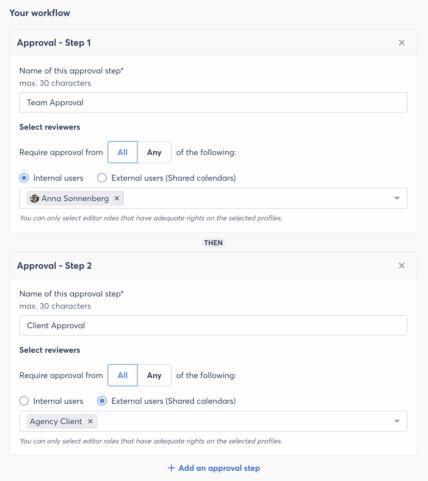
Next, map who gives the green light for posts to go live. Some teams create and publish internally. Others route posts through one reviewer or several.
If posts need several people to review, look for approval workflows with defined roles, permissions, and multistep paths. They make it easy for everyone to follow the process and confirm sign-off.
Language needs
Does your social team speak more than one language? If you create, review, or reply to posts in multiple languages, confirm the platform supports that workflow. Also check whether team members need the interface itself in their own language.
Step 3: Evaluate the core capabilities
Once you’ve mapped outcomes and workflows, it’s time to assess what each platform can do. For each capability, consider the level of support your team needs today and what you may need by the end of the contract.
Content creation and AI assistance
AI has made it easier for any team to generate social media drafts and new versions of posts. But when your team drafts in a separate AI assistant, you end up adding manual steps to your workflow. A colleague still has to copy and paste drafts into your social media platform, adapt them for each profile, and send them for approval.
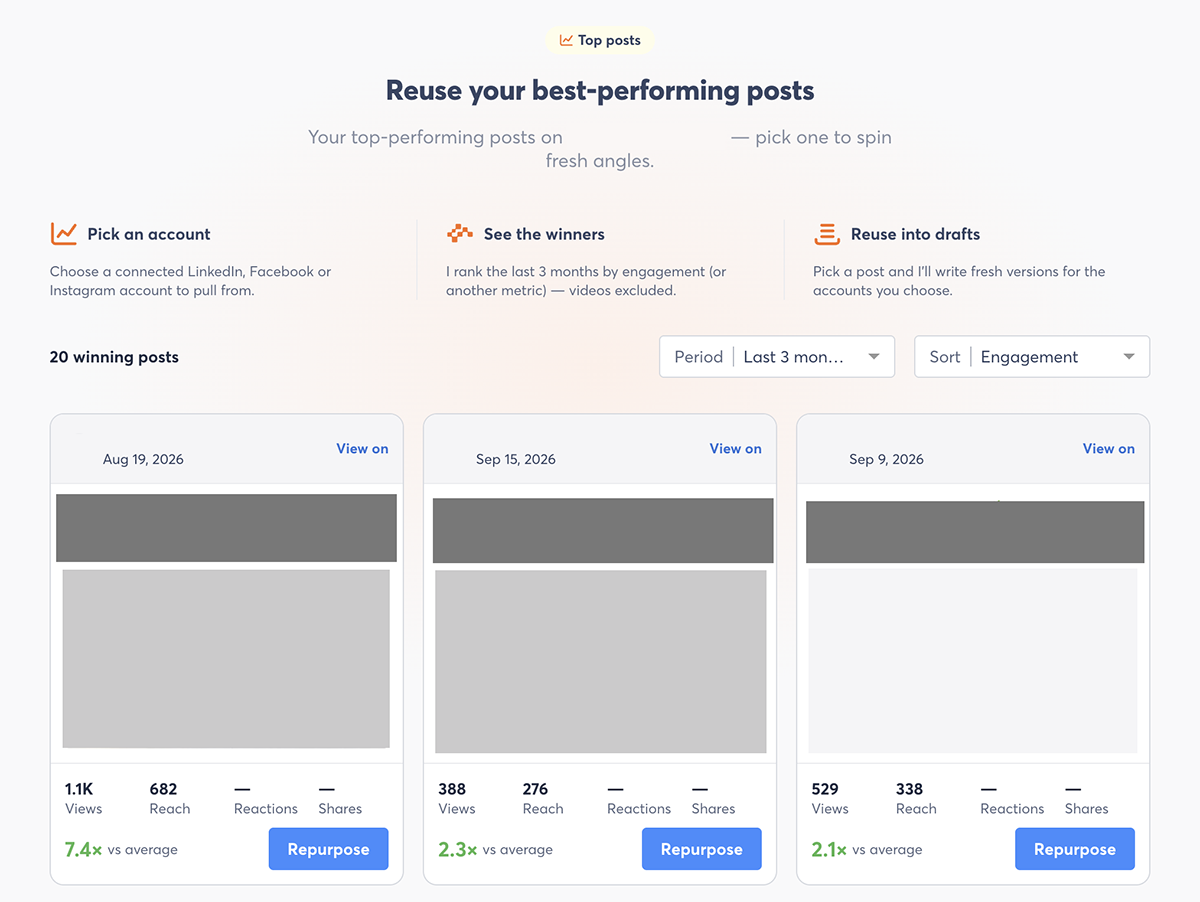
If AI content creation is important to your team, look for built-In AI features. Ideally, they’ll go beyond a basic AI assistant wrapper and identify your top performing posts, draft in your brand voice, and adapt posts for each profile.
Publishing and approvals
At minimum, you’ll need scheduling across all your profiles plus a content calendar everyone can see. If you have a social media approval workflow, you’ll also need review capabilities. Drafts, comments, edits, and the final decision should all be visible in the platform.
Engagement and inbox management
When a post takes off, comments and direct messages (DMs) can fill your inbox faster than one person can handle. A shared inbox makes it easy to review and respond to engagement from every profile in one view.
Check whether you can assign conversations, see who’s responding, and mark items as done. These features help your team avoid missed or duplicate replies as you work together.
Employee advocacy
When you make sharing easy, colleagues can extend the reach of your social media content. Consider how much you want employee advocacy to become part of your distribution plan.
For occasional sharing, a quick Slack message may be enough. If you plan to run a formal program, look for tools that help you coordinate participation, suggest content, and measure results.
Social listening
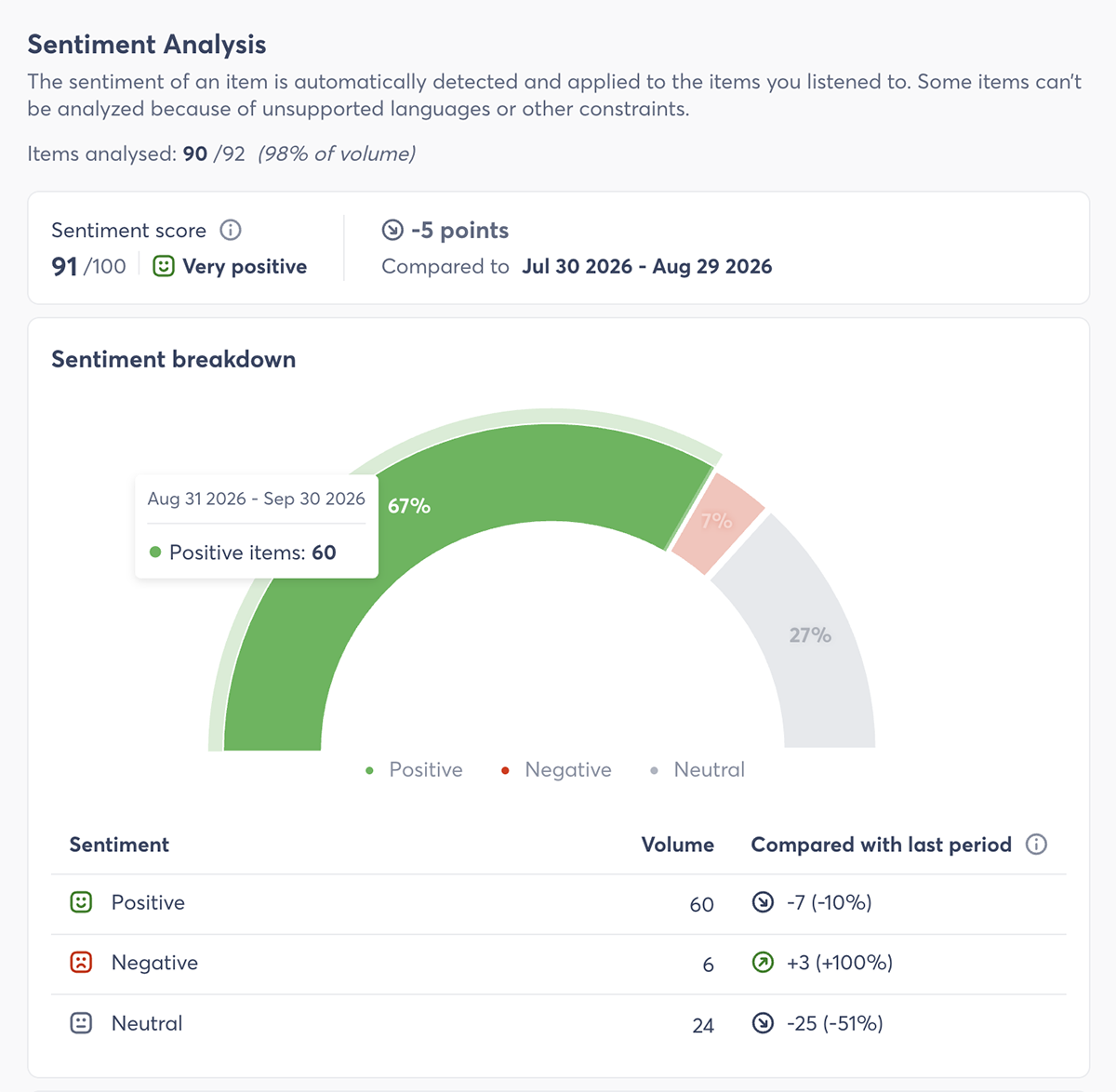
Comments and mentions on your brand’s content show only part of the social media conversation. Social listening helps you find what people say about your brand, competitors, and industry.
Decide how closely you need to follow the wider conversation. For example, you might only need to track untagged brand mentions. Or you might want to monitor topics and competitors to inform your social media strategy.
Reporting
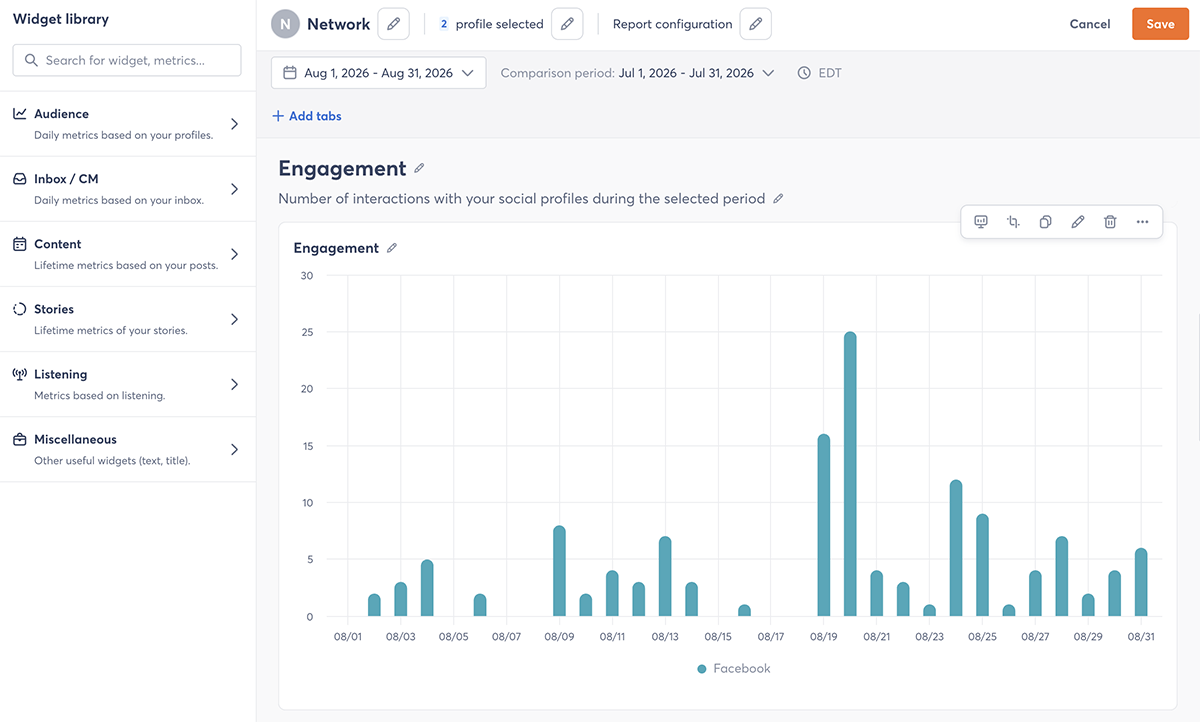
Who reads your social media reports and what do they need to know? Depending on your audience, you might want to include a quick view of top posts, trends across campaigns, or insights and recommended actions for colleagues.
If you tend to combine social data with other sources, confirm that you can customize and export reports. Then check whether the platform can connect social media activity with business outcomes.
Network and integration support
Confirm the platform connects to every social network your team uses, including any you plan to add during the contract. Then check which post types and features it supports on each network. For example, a tool might schedule standard posts on a network but not stories or first comments.
Look at the software integrations too. Connections to your content library, customer relationship management (CRM) system, or web analytics can reduce the manual work you have to do and help you link social activity to business results.
Ease of use
A capable platform only works if your team can use it and is willing to adopt it. Adoption is a common sticking point. According to Gartner, marketing teams actively use just 49% of the technology in their stacks.
Pay attention to how quickly a new user can complete common tasks, like editing a scheduled post or pulling a report. Consider occasional users too. Reviewers and contributors who log in once a week should be able to find what they need without watching a tutorial each time.
Step 4: Understand how pricing works
Start with the pricing model. Per-user pricing can get expensive when many stakeholders need access, while per-profile pricing can add up for agencies and enterprises that manage a lot of accounts.
Some platforms charge for both. Check how each model would apply to your team size and profile count.
Next, look at the plan tiers. A tiered package may require you to pay for features you won’t use so you can access the few you need. Capabilities like listening or advocacy may also be paid add-ons.
Ask each vendor for a total cost for the first year. It should include every seat, profile, and add-on your team needs, plus one-time fees for setup, onboarding, or data imports.
Question how pricing works at renewal, too. When Twin City Web Solutions‘ previous platform more than doubled its price with little warning, owner Brian Hunt was caught off guard. “They increased prices but didn’t tell anybody that was an existing customer,” he shares.
Finally, factor in any separate tools you’d still need to cover gaps. An inexpensive platform can cost more to run if it requires other subscriptions.
Consolidating can also cut costs. “We saved a lot of money switching to Agorapulse. By switching, we canceled not one but two services and saved over $100K annually,” says Hillsdale College social media coordinator Gianna Marchese.
Already using a platform and weighing whether to renew? Compare the cost of switching versus staying.
Step 5: Test with your own workflows
As helpful as a software demo can be, it only shows what a platform can do with test data. A trial or pilot shows how it handles your team’s content and processes.
Testing before you commit can prevent costly surprises. In Capterra’s 2026 Software Buying Trends Report, 89% of buyers who regretted a software purchase had hit snags while implementing it.
Once you sign up for a trial or pilot, run several posts through your full workflow, from creation and approval to publishing and reporting. Invite the people responsible for each stage to take part. Include your least enthusiastic team member for a realistic read on adoption.
Don’t stop at publishing. Reply to comments in the shared inbox, set up a listening search, and share a post through the advocacy feature.
Use the trial period to get answers to a few key questions:
- Does this trial include every feature in the plan we’re considering? Some trials unlock top-tier features or limit others, so confirm you’re testing what you’d pay for.
- What data can we import, and what can we export if we leave? Ask about data types, date ranges, formats, and any fees.
- Can we add or remove users, profiles, or features mid-contract? Flexible terms help the platform keep up as your team changes.
Step 6: Compare options with a weighted scorecard
After testing more than one platform, you need a consistent way to compare them. A weighted scorecard keeps the decision tied to your priorities.
Build your criteria from the outcomes you defined in the first step. Then, assign a weight to each one. For example, if approvals are your biggest concern, give reviewer access and multistep approval paths more weight than a feature you’d use occasionally.
Say your team weights approvals at 40%, AI content creation at 35%, and reporting at 25%. You’d score each platform from 1 to 5 on every criterion, multiply each score by its weight, and add the results.
| Criterion | Weight | Platform A score | Platform A weighted | Platform B score | Platform B weighted |
| Approvals | 40% | 5 | 2.00 | 2 | 0.80 |
| AI content creation | 35% | 3 | 1.05 | 4 | 1.40 |
| Reporting | 25% | 3 | 0.75 | 5 | 1.25 |
| Total | 100% | 3.80 | 3.45 |
A platform with standout reporting but a weak approval process may then rank below one that handles your top priority well. Use the same scorecard for every platform. Record what you tested or verified to support each score so you can explain your recommendation to stakeholders.
Choose the social media management tool that fits how your team works
The best social media management tool depends on what your team needs to do, the workflows you use, and the budget you’re working with. Start with outcomes, map your workflow, and trial potential options. A consistent scorecard will then help you make a decision you can stand behind.
Curious if Agorapulse belongs on your shortlist? Sign up for a free 30-day trial and start testing it today.
Frequently asked questions
How do I choose a social media management tool?
Start by defining the outcomes you need, like smoother approvals or better reporting. Then map who will use the tool and how. Evaluate each platform’s core capabilities, understand its pricing model, and test your shortlist with your own workflows. Finally, compare your options with a weighted scorecard tied to your priorities.
How long should it take to choose a social media management tool?
Aim to decide within about three months. According to Capterra’s 2026 Software Buying Trends Report, successful software adopters typically choose within that window, while longer timelines are linked to dissatisfaction. Defining your goals and requirements upfront helps you move quickly.
How many social media management tools should I compare?
Narrow your list to three or four platforms before you start trials. That’s enough to compare meaningful differences without overwhelming your team. A shortlist also makes it easier to test each tool thoroughly with your real workflows.